

Describing Software Behavior

A developer merges a PR. CI passes. The feature ships. Two days later, the product manager asks why it doesn’t do what they asked for. Everyone on the team remembers a different version of the story.
This is not a rare scenario. It happens when a team uses one artifact to describe what software should do and a different artifact to prove that it does. In this post, we’ll look at the artifacts we actually produce - requirements, user stories, code, tests, binaries - and how they connect, how they drift apart, and how we keep them honest.
Development Process
Software development is a multi-step process. Every step produces a specific type of output. If we want to boil it down, we create the following artifacts:
- Requirements: The client introduces their needs
- User Stories: We turn the requirements into high-level action items (after discussions and a common agreement)
- Code: We write the code to implement the product
- Tests: We create tests to verify that the product behaves as expected
- Binary: The executable software
Obviously, phases can overlap, repeat, or even be reordered. For example, using agile methodologies or TDD, having new feature requests, and using interpreted languages can alter the process. The important thing is that these are the primary artifacts we create while developing the software, and most of them are present1.
It may be surprising that all these artifacts do the same thing: they describe the software’s behavior. The difference is the syntax and abstraction level:
- The requirements are free-text and easily understandable by anyone who knows the domain2.
- User stories are more formal. In an ideal world (after refinement), they contain examples and user acceptance tests (UAT). According to best practices the team and the stakeholders should agree on them.
- Code is the ultimate description of the software’s behavior. If we change the code, the software will behave differently.
- We often call tests executable documentation. They are as formal as the code but grasp a different perspective. The tests define what the software should do, while the code describes how it does its thing.
- A binary is also code: the only code that computers directly understand.
Creating them is very time-consuming and requires extensive manual work. This is why software development is error-prone. All these should describe the same behaviors, in theory3. But real life is very different. So, somehow, we need to ensure that these are in sync.
We have two simple strategies to ensure consistency: automation and verification4.
A Closer Look at User Stories
Earlier, we listed user stories as a single artifact. That’s a simplification. In practice, the user story is not one layer but three, and the difference between them is precision.
- Stories capture intent. One or two sentences that name who wants something and why. They are easy to write and easy to agree on, because they leave almost everything open (especially the “how”).
- Acceptance criteria capture boundaries. They list the conditions that must hold for the story to be “done,” without prescribing how. Still free-text, but much harder to wave away.
- BDD scenarios capture exact behavior. Given some state, when some event happens, then some outcome follows - with real examples, not hand-waving.
These aren’t competing approaches. They are layers of increasing precision, each one nailing down what the previous one left ambiguous. Story is the intent. Acceptance criteria are the shape. BDD scenarios are the shape filled with numbers.
Most teams stop at stories. Then they wonder why the implementation doesn’t match what was intended. In a nutshell: they asked for a map and accepted a sketch.
Example Mapping
So how do we walk a story down the precision ladder without turning it into a three-week design phase? This is where example mapping earns its place.
Example mapping is a twenty-five-minute workshop. At minimum, a developer, a tester, and the product owner sit around a table - physical or virtual - with sticky notes. One story at a time. That’s the whole setup.
The flow is simple:
- Write the story on a yellow note.
- Underneath, write acceptance criteria on blue notes - one per rule.
- For each rule, write concrete examples on green notes. Specific inputs, specific outputs, specific edge cases.
- When the team disagrees on an example, park the question on a red note. Those red notes are the team’s requirements gaps, made visible before they became bugs.
Twenty-five minutes. No tool. No template. The output is a story that has been walked all the way down the precision ladder, in a room, by the people who need to agree.
It’s not a new idea - Matt Wynne introduced it in 20155. What’s new is that every AI coding assistant on the market can now consume a well-formed BDD scenario and produce something reasonable. The layer between the story and the code just got a lot more valuable.
Automation
All of these artifacts exist for a reason. In other words, we need all of them. But what if we don’t create them manually but generate them from one of the others? Then, we generate the output from scratch every time the source format changes. This way, we don’t have to look for places we need to update; by definition, the source and the output will be in sync.
This approach has two preconditions:
- We need a way to convert one format to another effortlessly
- The generation needs to be deterministic
Compiling the code into a binary is a classic example. And indeed, we don’t write machine code by hand anymore. Because of this (and because we already saw that binaries are low-level code), we’ll treat binaries as code in the rest of the article and don’t mention them specifically.
A less obvious example is executable specifications. For instance, Gherkin or FitNesse.
But not everything is easy to automate. Think of the user stories. Two developers can’t even agree on using tabs or spaces6. It is on another level to make them understand user stories the same way and transform them into code. But there is hope: coding guidelines, standards, and evolving tooling7 constantly make these steps more consistent and effortless.
Generating one asset from the other has one more Achilles heel: errors in the source. Because the generated artifact will contain that error, too. For example, if the code has a typo in a print statement, the generated binary will print the message with the typo.
This is when we can turn the situation into an advantage: we can cross-verify the different behavior descriptions.
Verification
The Oxford Dictionary has the following definition for “verification”:
[Verification is] the act of showing or checking that something is true or accurate.
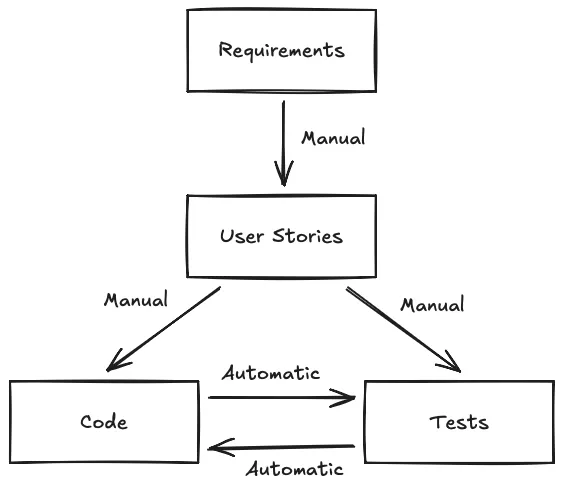
For us, verification means checking that our assets are telling the same story. If we’re unsure of something, we must step up one abstraction level and check there. In other words, we verify user stories based on requirements, code and tests based on user stories.
Can we automate those checks? Currently, we can’t reliably verify the contents of free text. Not to mention two texts with different structures. (Yes, AI tooling is getting better, but we are still not there yet.)
What about code and tests? They are formal; therefore, they should be easier to verify. And indeed, we write tests to verify the code. The beauty is that this goes both ways: the code can verify tests.
All of us were in a situation where we looked at our code for hours and didn’t understand why it didn’t pass the tests. Ultimately, it turned out we made a mistake in the test.
This is another reason why we shouldn’t generate tests from the code. They will verify one thing: that the code works as the code works. How useful. If we have a bug8, the test will confirm the bug as the expected behavior. We’ll have false confidence, ensuring we’ll have a more challenging time catching the bug.
As a summary, we can visualize the verification paths with the following diagram:
Reducing the Number of Levels
After all the manual verification this involves, we naturally want to collapse the levels - fewer artifacts, fewer sync problems. The industry has tried this for fifty years, and the results are… interesting.
We call languages that focus on the “what” declarative languages. For example, SQL (1974) and Prolog (1972) were both designed so that non-developers could describe their problems directly. SQL became ubiquitous, but even developers often struggle to write proper queries. Prolog stayed a niche language. If we can’t get engineers to use these tools consistently, expecting end users to do so was always optimistic.
So, if we can’t teach humans to speak formal languages, why not teach computers to understand ours? That’s the large-language-model bet. The recent progress is impressive, and today’s mundane tasks will be bad memories tomorrow - probably9. But we live in the present, and LLMs still can’t reliably bridge a vague story to correct code without the team doing the precision work first.
So the precision work is the lever we have today. Not a new tool, not a new language, not a new model. A twenty-five-minute workshop and a habit of walking stories down the ladder before the code catches up.
Conclusion
We describe software behavior on multiple levels because different roles need different levels of detail. Collapsing the levels has been a fifty-year project that hasn’t paid off. At least not yet. Between the artifacts we already have, the only sustainable sync mechanism is to walk them down the precision ladder - story, acceptance criteria, BDD scenario - before the code catches up.
TLDR:
- Stories, acceptance criteria, and BDD scenarios aren’t competing approaches - they’re layers of increasing precision.
- Stories capture intent. Acceptance criteria capture boundaries. BDD scenarios capture exact behavior with examples.
- Most teams stop at stories and wonder why implementation diverges from what was intended.
- Example mapping is a 25-minute workshop that walks a story down the ladder in the room, with the people who need to agree.
- The precision work is the lever you have today - not a new tool, not a new language, not a new model.
Try this week: take one story from your current sprint. Write three concrete examples of what “done” looks like: specific inputs, specific outputs, specific edge cases. If the team disagrees on any one of them, you just found a requirements gap before it became a bug. That is the cheapest bug fix you’ll do all year.
Media attributions:
- Cover image by the author (generated with Gemini)
- “Say what?” GIF via Tenor
- Verification paths diagram by the author (drawn in Excalidraw)
Footnotes
-
Because we always write tests, right? ↩
-
Presuming that they’re free of contradictions (which they usually aren’t). ↩
-
And we know what the difference is between theory and practice. In theory, nothing. ↩
-
Simple, but not easy. ↩
-
Matt Wynne’s Introducing Example Mapping from 2015 is still the canonical write-up. ↩
-
Looking at you, AI. ↩
-
Every decent application contains at least one line of code and one bug. ↩
-
The word “probably” is carrying a lot of weight here. ↩